
Article: When xCAD Is the Better Choice over all Autodesk Products?
When xCAD Is the Better Choice over all Autodesk Products?

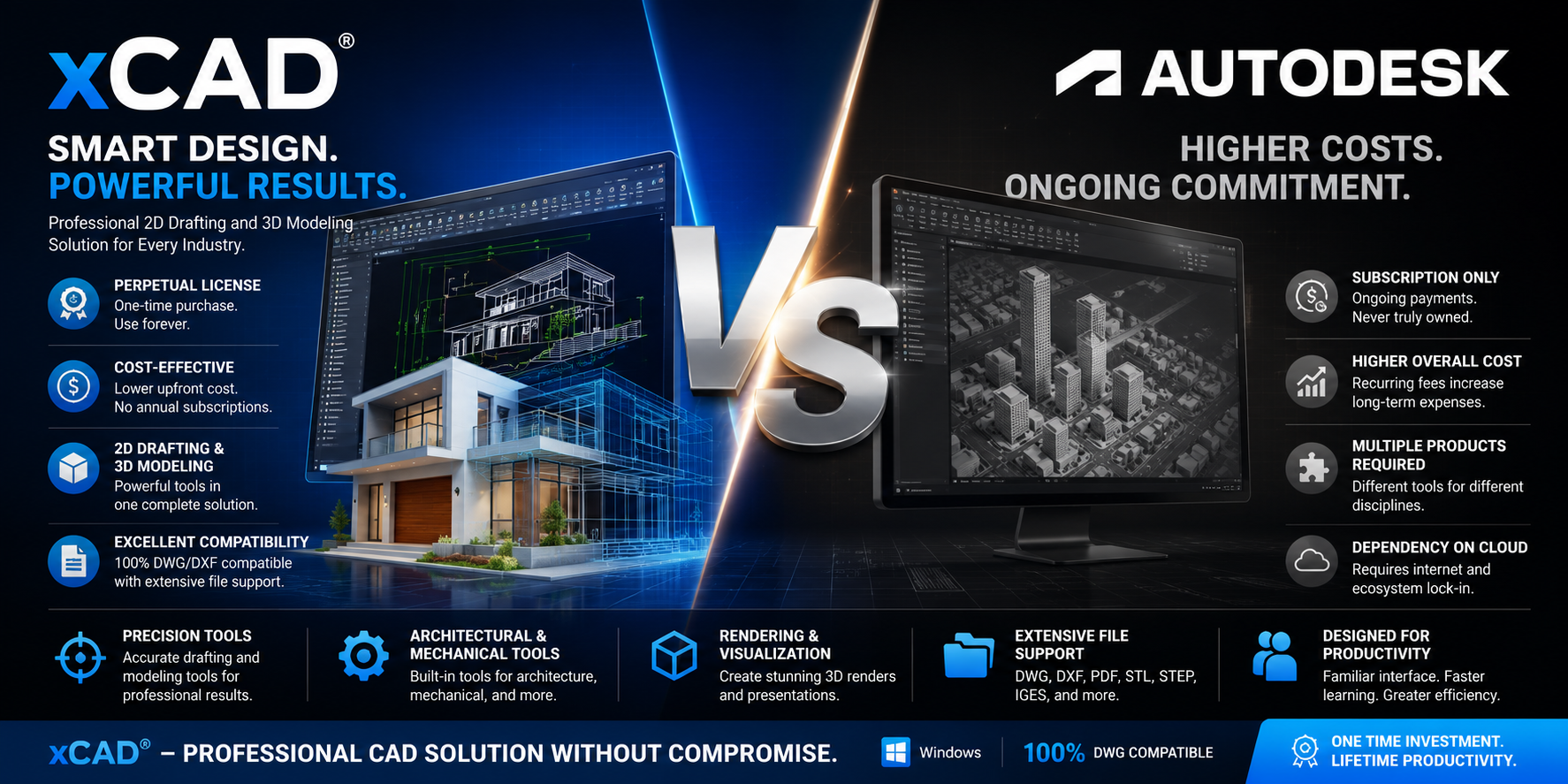
xCAD offers several advantages over Autodesk's CAD products (such as AutoCAD, AutoCAD LT, Fusion, or Inventor), particularly for users seeking a cost-effective perpetual license with strong 2D drafting and 3D modeling capabilities. The exact comparison depends on which Autodesk product you're comparing against, but here are the major advantages xCAD commonly provides:
| Feature | xCAD | Autodesk CAD Products |
|---|---|---|
| Perpetual License Available | ✅ Yes | ❌ Mostly subscription only |
| Lower Total Cost | ✅ Significantly lower | ❌ Higher long-term subscription costs |
| 2D Drafting | ✅ Professional-grade | ✅ Industry standard |
| 3D Solid Modeling | ✅ ACIS-based | ✅ Available (varies by product) |
| Architectural Tools | ✅ Built-in | ✅ Available in specialized products |
| Mechanical Design Tools | ✅ Included | ✅ Often requires Inventor or specialized toolsets |
| Rendering | ✅ Built-in visualization | ✅ Available depending on product |
| DWG/DXF Compatibility | ✅ Excellent | ✅ Native |
| Customization | ✅ Extensive | ✅ Extensive |
| Learning Curve | Easier for AutoCAD users | Moderate to advanced |
1. Much Lower Cost of Ownership
One of xCAD's biggest advantages is affordability.
xCAD
- One-time perpetual license option
- No mandatory annual subscription
- Lower upgrade costs
- Suitable for individuals and small businesses
Autodesk
- Primarily subscription-based
- Ongoing annual or monthly payments
- Higher long-term ownership costs
For organizations with multiple users, xCAD can significantly reduce software expenses over several years.
2. Perpetual Licensing
xCAD allows users to purchase a permanent license.
Benefits include:
- Continue using the software indefinitely
- No recurring subscription fees
- No risk of losing access if the subscription expires
- Better long-term investment for many users
Autodesk has largely transitioned to subscription licensing.
3. Comprehensive 2D and 3D in One Package
xCAD combines:
- Professional 2D drafting
- 3D solid modeling
- Surface modeling
- Rendering
- Mechanical tools
- Architectural tools
Many Autodesk workflows require separate products depending on the design discipline.
4. Professional ACIS Solid Modeling
xCAD Professional and Platinum editions include the ACIS solid modeling engine, enabling:
- Parametric solid modeling
- Boolean operations
- Precision engineering
- Manufacturing-ready models
- Complex mechanical parts
This makes xCAD suitable for engineering, manufacturing, and product design.
5. Familiar AutoCAD-like Interface
Many users transitioning from AutoCAD appreciate TurboCAD's familiar workflow, including:
- Command line support
- Toolbars
- Ribbon interface
- Keyboard shortcuts
- Similar drafting commands
This can reduce training time.
6. Strong DWG Compatibility
xCAD supports:
- DWG
- DXF
- DWF
- STL
- STEP
- IGES
- SAT
- SKP
- OBJ
- 3DS
This facilitates collaboration with clients and partners using other CAD software.
7. Advanced Drafting Tools
xCAD includes features such as:
- Smart dimensions
- Constraints
- Layer management
- Blocks
- External references
- Dynamic snapping
- Hatch patterns
- Annotation tools
- Paper space layouts
These tools support efficient production of technical drawings.
8. Integrated Architectural Features
xCAD includes tools for:
- Floor plans
- Walls
- Doors
- Windows
- Roofs
- Stairs
- Elevations
- Sections
- Construction documentation
Architects and residential designers can work without purchasing additional software.
9. Mechanical Design Capabilities
xCAD offers:
- Precision dimensioning
- Mechanical drafting
- Assemblies
- 3D parts
- Sheet layouts
- Manufacturing drawings
These capabilities make it suitable for machine design and industrial applications.
10. Flexible Rendering
xCAD includes rendering tools that support:
- Lighting
- Materials
- Shadows
- Reflections
- Photorealistic presentations
This reduces the need for separate visualization software for many projects.
11. Extensive File Format Support
xCAD can import and export numerous formats, including:
- DWG
- DXF
- STEP
- IGES
- SAT
- STL
- OBJ
- 3DS
- SKP
- SVG
- BMP
- PNG
- JPEG
This broad compatibility simplifies data exchange.
12. Customization and Automation
xCAD supports customization through:
- Custom toolbars
- Menus
- Keyboard shortcuts
- Macros
- Scripting
- Custom templates
- User-defined workspaces
Users can tailor the environment to their workflows.
13. Suitable for a Wide Range of Industries
xCAD is used in:
- Architecture
- Mechanical engineering
- Civil drafting
- Product design
- Manufacturing
- Interior design
- Landscape design
- Woodworking
- Construction
- Education
14. Good Performance on Typical Hardware
xCAD generally performs well on standard Windows workstations, making it a practical choice for users who don't require the highest-end hardware for everyday drafting and modeling tasks.
When xCAD Is the Better Choice
xCAD is often a strong fit if you:
- Want a perpetual license instead of an ongoing subscription.
- Need professional 2D drafting and 3D modeling in a single application.
- Want to minimize long-term software costs.
- Require broad CAD file compatibility.
- Prefer an AutoCAD-like workflow with a shorter learning curve.
- Are a freelancer, small business, educator, or organization seeking a cost-effective CAD solution.
Overall, xCAD's strongest advantages are its lower total cost of ownership, perpetual licensing, comprehensive feature set, broad file compatibility, and strong balance of professional 2D drafting and 3D solid modeling, making it an excellent alternative for many designers, engineers, architects, and CAD professionals.

Written by xCAD 2D3D

,%20particularly%20for%20users%20seeking%20a%20cost-effective%20perpetual%20license%20with%20strong%202D%20dra...)
Leave a comment
This site is protected by hCaptcha and the hCaptcha Privacy Policy and Terms of Service apply.